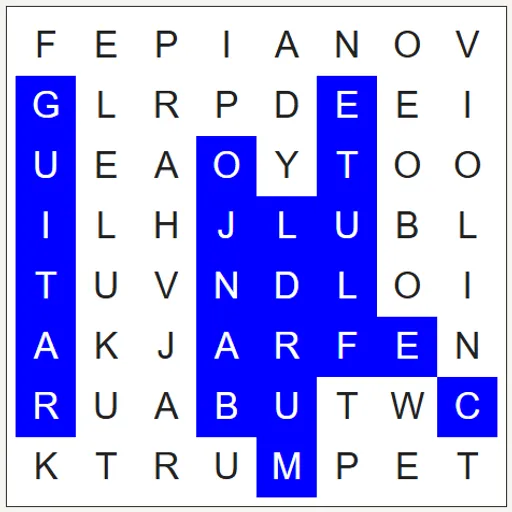
Word Search hands you a square of letters and a list of twelve words to find. Each word sits in a straight line and can run forward, backward, up, down or along a diagonal. Drag across a word and it is crossed off the list. This Word Search is built on WordFind.js, an open-source puzzle generator by Bill of BunKat LLC with additions by Lucas-C, and it lets you turn any word list into a new puzzle.
How to find a word
A themed list such as Animals, Music or Ocean is chosen when the page opens. Pick a word, scan the grid for its first letter, then press on that letter and drag straight to the last one.
If the letters match a word on the list, they turn blue and the word gets a line through it. A selection that matches nothing simply clears. Find all twelve and the grid turns green.
Three buttons help along the way. Solve Puzzle shows every word you have not found in purple. New word list moves on to the next of seven themes. New grid with these words shuffles the current list into a fresh layout.
Word Search Controls
| Action | Keyboard | Mouse | Touch |
|---|---|---|---|
| Select a word | — | Press on the first letter and drag to the last | Touch the first letter and slide to the last |
| Switch to the next themed word list | — | Click "New word list" | Tap "New word list" |
| Make a new grid from the words shown | — | Click "New grid with these words" | Tap "New grid with these words" |
| Add or change a word | Type in a word box | Click "Add word" for an extra box | Tap "Add word" for an extra box |
| Reveal the remaining words | — | Click "Solve Puzzle" | Tap "Solve Puzzle" |
What a word search trains
This is a visual scanning game. Your eyes sweep rows, columns and diagonals looking for a pattern, which builds focus and attention to detail. Reading words backward and on a slant also stretches the part of your brain that recognizes letter shapes.
It works well in a classroom too. Teachers can type in vocabulary words, spelling lists or science terms and get a new puzzle in seconds.
Search strategies
- Look for rare letters. The random filler never uses Q, X or Z, so any of those belongs to a word.
- Find the longest word first. The grid starts exactly as wide as the longest word, so it often fills a full row, column or diagonal.
- Try reading in reverse. If a first letter leads nowhere, find the last letter and read the line backward.
- Trust the highlight. When the trail stops growing, you are off course.
- Search around found words. Words often cross, so a found word points to its neighbors.
Practical Notes for Players
On a narrow screen, the grid sits above the word list and shrinks to fit. A puzzle takes five to ten minutes. For another calm activity, try Pixel Sketch Studio. For a puzzle with more logic, try Number Path.
Tested and updated: