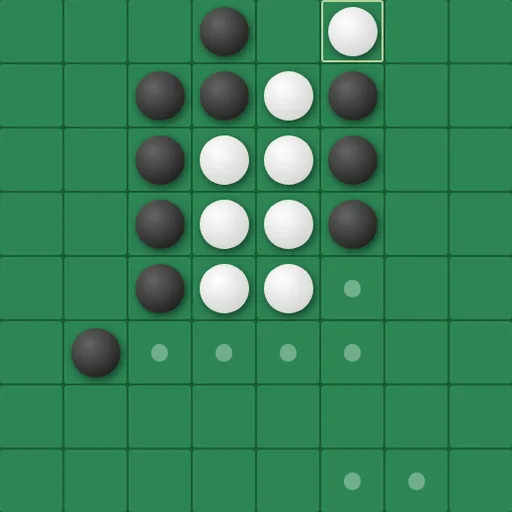
Universal Reversi is a disc-flipping strategy game played on a board that wraps around on every side. You trap your opponent’s discs in straight lines to turn them your color, and the player with more discs at the end wins. The twist changes the geometry: a line that runs off one edge reappears on the opposite edge, so the usual safe corners do not exist. Norbert Nopper built it with five computer levels and three board sizes.
How a game runs
Four discs start in the center, two of each color on a diagonal. On your turn, place a disc so that one or more enemy discs lie in a straight, unbroken line between it and another of your discs. All of those trapped discs flip. Lines count in all eight directions and can cross a border.
Dots show every legal square. If you have no legal move, your turn is skipped. When neither player can move, the discs are counted. By default you play Black against the computer on an 8x8 board, but you can also play a friend or watch two computers.
Universal Reversi Controls
| Action | Keyboard | Mouse | Touch |
|---|---|---|---|
| Place a disc | — | Click a cell marked with a dot | Tap a cell marked with a dot |
| Shift the view of the board | Arrow keys | Click the PAN arrow buttons | Tap the PAN arrow buttons |
| Start a new game and apply settings | — | Click "Reset Game" | Tap "Reset Game" |
| Change players, board size or difficulty | — | Use the Game Settings panel, then reset | Use the Game Settings panel, then reset |
Geometry on a donut
Mathematicians call a grid whose edges wrap like this a torus, the shape of a donut. On a torus, every square has the same number of neighbors, so the board has no special spots. Spotting wrapped lines takes practice, because a line that looks broken on screen may continue past the edge. The PAN buttons and arrow keys shift the view so a wrapped line sits in one piece.
Tips for a board with no corners
- Check all eight lines from each square, including ones that cross a border.
- Pan the board often to see lines that wrap.
- Early on, aim to have more legal moves than your opponent rather than more discs.
- Flipping many discs at once can open many new moves for your opponent. Quiet moves are often better.
- Slow the computer with the delay slider so you can see which discs flip after its move.
Settings worth knowing
You can choose a 6x6, 8x8 or 10x10 board. The computer delay runs from 0.02 to 2 seconds. An accessibility mode turns the discs into flat black and white with thick contrasting rings. For more strategy duels, try Go or Game of the Amazons.
Tested and updated: