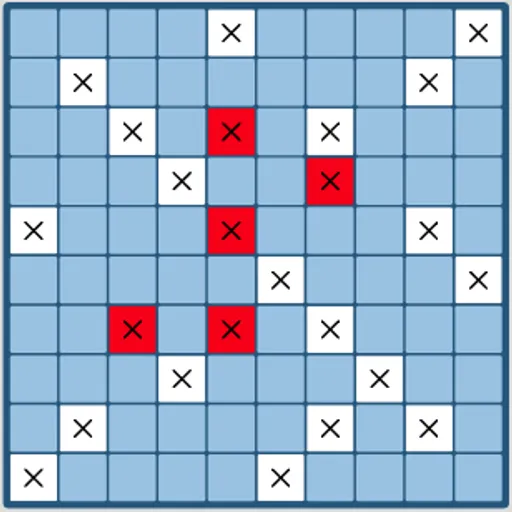
Fleet Strike is a naval guessing game for one player, played on two 10x10 grids. You hide five ships, then trade shots with the computer until one fleet is gone. It is a good workout for coordinate thinking and probability, because the computer opponent hunts with odds rather than luck, and you will need a plan of your own to keep up. Bill Mei wrote the original open-source version.
Setting up and firing
First, place your fleet on the Your Fleet grid. Choose a ship in the list, use Rotate Ship to set it across or up and down, and click a square to drop it in. A preview shows where it will land. The ships are an Aircraft Carrier of 5 squares, a Cruiser of 4, a Destroyer and a Submarine of 3, and a Patrol Boat of 2.
Press Start Game and click squares on the Enemy Fleet grid to fire. A white X marks a miss, and red marks a hit. Hit every square of a ship and it sinks. The computer answers with one shot after each of yours, and the first side to lose all five ships loses the game.
Fleet Strike Controls
| Action | Mouse | Touch |
|---|---|---|
| Pick a ship to place | Click its name in the Place Your Ships list | Tap its name in the list |
| Turn the ship before placing it | Click "Rotate Ship" | Tap "Rotate Ship" |
| Place the ship | Click a square on Your Fleet (a preview shows on hover) | Tap a square on Your Fleet |
| Fire a shot | Click a square on Enemy Fleet | Tap a square on Enemy Fleet |
| Play again after a game ends | Click "Restart Game" | Tap "Restart Game" |
The probability behind the hunt
Think of every square as a question: how many ways could the remaining ships cover it? A square in the middle of open water fits many placements, while a square boxed in by misses fits few. The computer does this count every turn. You can do a rough version in your head, and it changes how you search.
How to search well
- Use a checkerboard. The shortest ship is 2 long, so it must cover one square of every checkerboard color. Firing only on one color covers the grid with half the shots.
- Track what is still afloat. Once the Patrol Boat sinks, the smallest ship left is 3, so you can space your search shots even wider.
- Finish damaged ships. Try the four squares around a hit, then follow the line once you find a second one.
- Hide ships with care. The computer’s opening shots lean toward certain corners, so a ship tucked into a corner can be found early.
Saving, Devices and Play Time
The two grids sit side by side, so the squares are small on a phone held upright. A tablet or a computer screen works best. Your wins and accuracy are saved in the browser. The tabletop game Battleship uses the same basic idea. For another one-on-one duel with clear rules, try Four in a Row or Checkers.
Tested and updated: