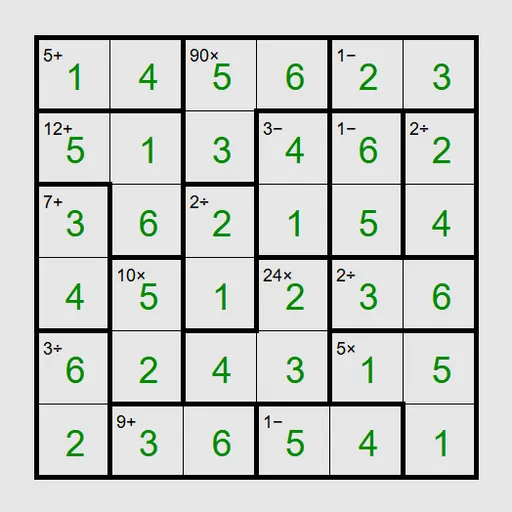
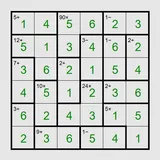
Math Cage Grid is an arithmetic logic puzzle built on a Latin square. Thick outlines divide the board into cages, and each cage carries a target plus an operation, like 9+ or 24×. You fill every square so the digits in each cage produce that target, while no row or column repeats a digit. The puzzle is Keen from Simon Tatham’s Portable Puzzle Collection, and it is a great workout for factoring and addition facts.
Rules of the Grid
On an N by N board, each row and each column uses the digits 1 to N exactly once. The cages add arithmetic on top.
- An addition cage must sum to its target.
- A multiplication cage must multiply to its target.
- Subtraction and division appear only on two-square cages, and the bigger digit can be on either side.
- A one-square cage simply gives you its digit.
Select a square and type a digit, or right-click to write pencil marks for options you are still testing. When every cage and line checks out, the board flashes.
Math Cage Grid Controls
| Action | Keyboard | Mouse | Touch |
|---|---|---|---|
| Enter a digit | Arrow keys to move, then type the digit | Click a square, then type a digit | Tap a square, then tap a digit button |
| Add or remove a pencil mark | Enter switches the cursor to pencil mode, then type a digit | Right-click a square, then type a digit | Set Tap to Pencil mark (or press and hold a square), then tap a digit |
| Clear a square | Space, Backspace or 0 | — | Tap the square, then Clear |
| Fill every empty square with all pencil marks | M | — | — |
| New game, undo, redo | N, U, R | Menu buttons above the grid | Menu buttons above the grid |
The Math You Practice
Each cage is a small “find the numbers” problem. A 12× cage over two squares on a 6x6 board could be 2 and 6 or 3 and 4. Over three squares it widens to sets like 1, 2, 6 or 1, 3, 4, or even 2, 2, 3 if the cage bends. Listing these sets quickly is exactly the factoring skill used in fractions and algebra.
The Latin-square rule then narrows the options. If a row already holds a 6, the 12× cage in that row cannot use 2 and 6 there. Combining the two kinds of reasoning is what makes the puzzle satisfying.
Solving Tips
- Take the free squares first. One-square cages are given answers.
- Spot the tight cages. On 6x6, a 5- cage must be 1 and 6, and 11+ over two squares must be 5 and 6.
- Watch for factors of 5. On boards under 10x10, any product containing a 5 forces a 5 into that cage.
- Use row totals. Every row on a 6x6 board adds to 21. If whole cages cover a row except one square, subtraction finds it.
- Fill notes with M. The M key writes every candidate in every empty square, then you prune.
Quick Facts About This Version
Presets run from a 4x4 Easy board up to a 9x9 grid, and Custom lets you choose sizes from 3 to 9. A multiplication-only option turns every cage into a product clue for extra factoring practice. Small boards take a few minutes; a 9x9 can fill a lunch break. If you enjoy the Latin-square layer, try Greater-Than Grid or Skyscraper Sightlines.
Tested and updated: