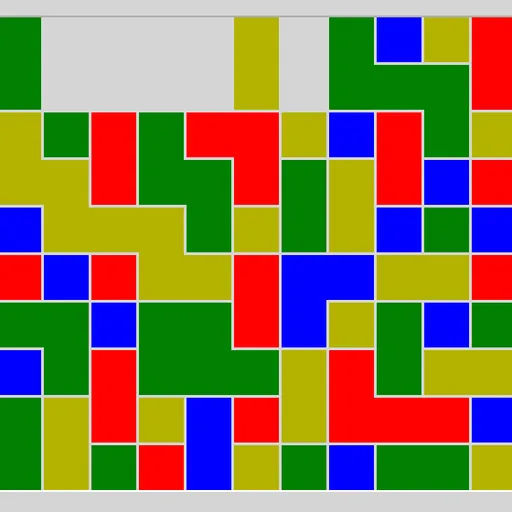
Same Game Blocks hands you a grid of colored squares and one goal: empty it. You may remove any group of two or more same-colored squares joined along their edges, and the board then reshapes itself under gravity. It rewards looking several moves ahead, which makes it a calm logic puzzle rather than a reflex test. James Harvey wrote it for Simon Tatham’s Portable Puzzle Collection.
Rules of a board
Click one square and its whole connected group lights up, while the status bar previews how many squares are chosen and what they would score. Click the group again to remove it, or choose another group instead.
After a removal, squares above the gap drop straight down. If a column becomes completely empty, every column to its right shifts left. A lone square can never be taken by itself. Clear everything and the status bar reads COMPLETE.
Same Game Blocks Controls
| Action | Keyboard | Mouse | Touch |
|---|---|---|---|
| Select a group | Arrow keys to move the cursor, then Space or Enter | Left-click a square in the group | Tap a square in the group |
| Remove the selected group | Space or Enter again | Left-click the selected group again | Tap the selected group again |
| Cancel the selection | — | Right-click the selected group | Press and hold the selected group |
| Undo, redo, new board | U / R / N | Undo move, Redo move and New game buttons | Undo move, Redo move and New game buttons |
Why order matters so much
Scoring is quadratic. Under the standard rule a group of n squares pays (n - 2) squared, so five squares give 9 while ten give 64. Two groups of five are worth 18 together, far less than one merged group of ten. The math pushes you to merge colors before cashing them in.
Gravity is what makes merging possible. When you remove a different color from between two patches of blue, the blue pieces fall or slide into contact. Thinking through those shifts is a kind of mental simulation, the same planning skill used in chess puzzles or programming.
A plan that works
- Pick one “target” color early and avoid touching it while you clear what separates its pieces.
- Start low. Removing groups near the bottom moves the most squares and creates new contacts.
- Count the last squares of each color. If one square ends up isolated from its color, the board cannot be finished.
- Treat pairs as tools. They score nothing under the standard rule, but they reshape the grid.
- Use undo freely to compare two orders on the same board.
Quick Facts About This Version
There is no timer, so you can think as long as you like, and small boards take only a minute or two. On touch screens, press and hold a selected group to cancel it. For a fast-paced cousin, try Color Tile Match, or plan stacks in Block Drop.
Tested and updated: