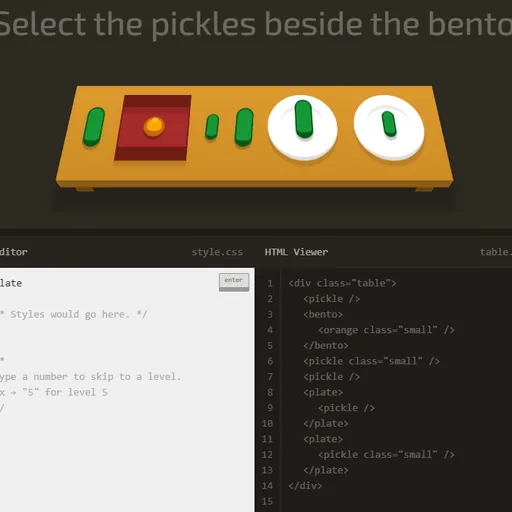
CSS Diner is a puzzle game that teaches CSS selectors, the part of a stylesheet that decides which elements a rule applies to. Each level sets a small dinner table with plates, bento boxes and pieces of food, then gives you an order like “select the pickles on the fancy plate”. Because the table is real HTML, CSS Diner checks your answer against actual elements, which makes it one of the fastest ways to feel how selectors behave.
Serving an order
The items you need to select wiggle on the table. Underneath, an HTML Viewer shows the markup for everything on it. On the right, a help panel names the selector for this level, explains its syntax and gives a few examples.
Type a selector into the CSS Editor and press Enter. If it matches exactly the wiggling items, they lift off the table and the next level loads. If it matches too much, too little or nothing, the editor shakes and you try again. There is no score or timer, so wrong guesses cost nothing.
CSS Diner Controls
| Action | Keyboard | Mouse |
|---|---|---|
| Type a selector | Type in the CSS Editor box | — |
| Check your answer | Enter | Click the "enter" button |
| Jump to a level | Type the level number, then Enter | Open the menu (top right) and click a level |
| See an item's HTML | — | Hover over an item on the table or a line in the HTML Viewer |
| Previous or next level | — | Click the arrows beside the level title |
| Close the level menu | Esc | — |
What the 32 levels cover
The levels build a full toolkit in a sensible order:
- Type, ID and class selectors, then combining them.
- Descendant selectors, comma groups and the universal
*. - The child
>, adjacent+and general sibling~combinators. - Pseudo-classes:
:first-child,:last-child,:nth-child,:nth-of-type,:only-child,:emptyand:not(). - Attribute selectors, including the starts-with, ends-with and contains forms.
Why it builds real skill
A selector is really a set description. You describe which items belong in the group, and the browser finds them. That is logic with a little bit of counting, especially in the nth levels where formulas like 2n+1 pick every other item. Those formulas are linear expressions, so students who know a bit of algebra will spot the pattern.
It also trains careful reading of structure. The same apple can be a child, a descendant or a sibling depending on where it sits. Learning to see the tree inside the HTML is a skill web developers use every day.
Tips for tricky tables
- Read the HTML Viewer before the order. The real tag names and classes are there.
- Hover over a table item to light up its line of code, and the other way round.
- A space and a
>are not the same. One reaches any depth, the other only one level down. - In
nthselectors, counting starts at 1, not 0. - When stuck, copy one of the help panel’s examples and change just one part.
Handy Details
Progress is saved in your browser, so you can stop at level 12 and come back later. The two-column layout and hover hints work best on a computer. After CSS Diner, try Flexbox Lily Pond for layout, then CSS Grid Carrot Patch for two-dimensional grids.
Tested and updated: