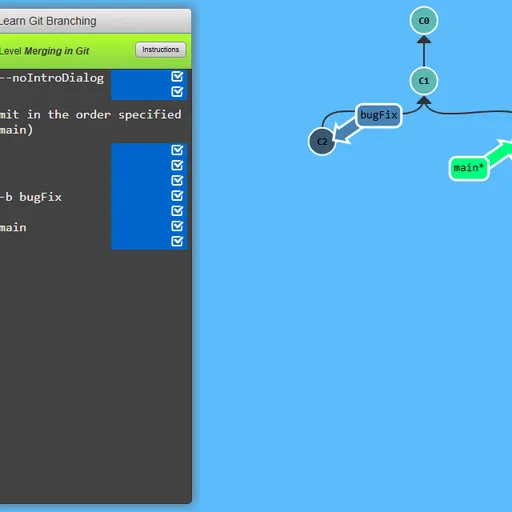
Learn Git Branching is a puzzle game that teaches git, the version control tool most programmers use to track changes. A terminal sits on one side and a live diagram of commits and branches fills the rest. Each level shows a goal tree, and you type real git commands until yours looks the same. Learn Git Branching by Peter Cottle makes an abstract tool visible, which is why so many coding courses point students to it.
Solving a level
A lesson opens first, usually with a short demo of the command the level teaches. Close it and type into the terminal. Commands like git commit, git branch feature and git checkout feature change the diagram at once, with circles for commits and labels for branches.
A floating window shows the target. Compare it with your tree, hide it, and keep typing. When the shapes match, the level is marked solved and the next one is offered.
There are 36 levels. The Main tab holds 20 in five groups, from the basics to advanced topics like relative references and rebasing many commits. The Remote tab adds 16 more on clone, fetch, pull and push, including the arguments those commands take.
Learn Git Branching Controls
| Action | Keyboard | Mouse |
|---|---|---|
| Type a command | Type anywhere on the page, then Enter | — |
| Open the level menu and pick a level | Type levels, then arrow keys and Enter | Click a level number in the menu |
| Compare your tree with the target | Type show goal (or hide goal) | Click Show Goal on the level bar |
| Get a hint or read the lesson again | Type hint, or objective | Click Instructions on the level bar |
| Take back the last command | Type undo (or reset to start over) | — |
| Page through a lesson or close it | Right arrow or Enter for next, Left arrow for back, Escape to close | Click the arrows or the check mark |
The logic behind git
A git history is a graph. Each commit points to its parent, and a merge commit points to two. Branches are just movable labels on those commits. Once you see that, commands stop feeling like magic. git rebase copies commits onto a new base, git merge adds a commit with two parents, and git reset moves a label backward.
Thinking this way is graph reasoning, the same skill behind family trees and route maps. Each level is a small puzzle about getting from one graph to another in the fewest steps, so planning matters as much as knowing commands.
Smart moves
- Find the asterisk first. It marks where HEAD is, and new commits land there.
- Use
main^orHEAD~2instead of reading commit IDs off the screen. - Look at the goal for clues. Copied commits mean rebase or cherry-pick, while a commit with two parents means merge.
- Type
undofreely to test an idea. - Spend a few minutes in
sandboxmode before the remote levels.
Handy Details
Everything is typed, so you need a physical keyboard. Progress is kept in your browser between visits. If you want another coding puzzle with a visual result, try Elevator Saga, or solve a database case with queries in SQL Detective Mystery.
Tested and updated: