Elevator Saga is a programming puzzle in which you control a building’s elevators with JavaScript instead of buttons. Riders appear on floors, press up or down, and wait. Your code decides where each car goes. Elevator Saga is worth playing because it turns event-driven programming and basic algorithm design into something you can watch succeed or fail in real time.
Running a building
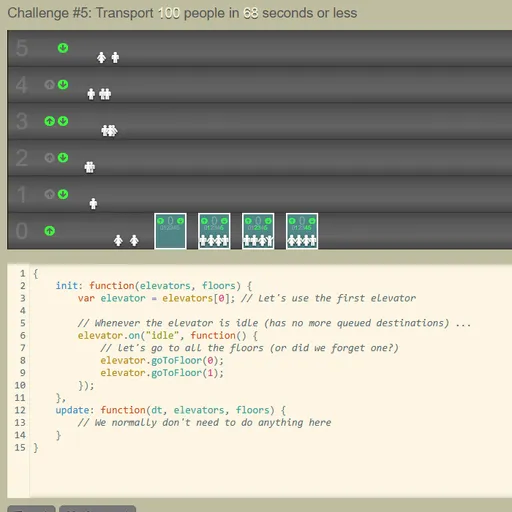
The top of the screen shows the floors, the cars and little people moving in and out. Below it sits a code editor with a starter program. It works, but badly, since it only shuttles one car between the two lowest floors.
You write your logic inside init. There you hook into events, such as a car becoming idle, a passenger pressing a floor button inside the car, or someone on a floor pressing up or down. Inside those handlers you call methods like goToFloor(), read loadFactor() to see how full a car is, or edit its destinationQueue directly.
Press Apply and the challenge restarts with your code. A stats panel tracks people moved, average and maximum wait, and total moves. Hit the goal and the game offers the next challenge.
Elevator Saga Controls
| Action | Keyboard | Mouse |
|---|---|---|
| Type and edit your elevator program | Type in the code editor (Tab inserts four spaces) | Click inside the editor to place the cursor |
| Run your code from the start of the challenge | — | Click "Apply" |
| Start, pause or restart the simulation | — | Click the Start / Pause / Restart button |
| Change simulation speed | — | Click the minus or plus icon next to the speed number |
| Go to the next challenge after a win | — | Click "Next challenge" |
| Save, reset, or bring back code from before a reset | — | Click "Save", "Reset" or "Undo reset" |
What it trains
At its heart this is a scheduling problem. You are deciding the order in which to serve requests, and different orders give very different results. Computer scientists study the same question for disk drives and delivery routes.
It also teaches you to think in events. Rather than writing one long list of steps, you write small reactions: when this happens, do that. Most modern apps and games work this way.
The goals add trade-offs. Some challenges reward speed, others punish too many moves, and others fail you if one rider waits too long. A rule that wins one challenge can lose the next, so you learn to measure before you change.
Approaches that work
- Send a car to whatever floor a rider presses inside it. That alone beats the starter code.
- Listen for up and down presses on floors so idle cars go where people are waiting.
- Skip pickups when
loadFactor()says a car is nearly full. - On move-limited challenges, wait for several riders before leaving instead of rushing.
- Raise the time scale to see quickly whether an idea holds, then slow down to find where riders get stuck.
Small Details That Help
The editor saves your program in your browser a moment after you stop typing. The layout is built for a wide screen and a real keyboard, so play on a computer. For a gentler coding warm-up, try Robot Coder, or explore commands of a different kind in Learn Git Branching.
Tested and updated: